Hidden windows & anti-capture seriesTools: IDA · Cheat Engine · Hawkeye Community
1. TL;DR & scope
SetWindowDisplayAffinity(WDA_EXCLUDEFROMCAPTURE) eventually sets
bit 6 (0x40) of a DWORD at
CWindowContext+0x114 inside dwm.exe, matching
dwmredir!CWindowContext::HasProtectedContent
(SHR 6; AND 1).
The win32k path mostly forwards protection into DWM; a practical defender-side surface is
scanning CWindowContext objects (vtable + flag + HWND/PID), not tagWND alone.
Test environment: Windows 11 x64, build 26100 (figures below).
The detection approach applies to Windows 10 and Windows 11;
absolute field offsets in the figures vary by build, but the
vtable + protection bit + HWND/PID pattern is the same.
Hawkeye Community resolves the vtable from dwmredir.dll (PDB)
and discovers object-relative offsets during !hidden_windows -init — no
hard-coded layout in the open-source scanner.
Scope: detection and reverse-engineering notes for triage tooling; not a
bypass or evasion guide.
2. Background & series
SetWindowDisplayAffinity (typically with WDA_EXCLUDEFROMCAPTURE)
is a well-known way to keep a window visible on the desktop while excluding it from
most screen-capture and recording APIs.
This series has three parts. This article is part 1:
Part 1 (this page): SetWindowDisplayAffinity — mechanism & detection
Part 2: Visual-layer hiding — mechanism & detection
Part 3: BitBlt-style “super screenshot” approach
3. Win32k chain
The user-mode API enters the kernel at
win32kfull!NtUserSetWindowDisplayAffinity; core logic lives in
SetDisplayAffinity. Simplified flow:
DwmAsyncUpdateSprite ultimately delivers an LPC message to the
dwm.exe process. Aside from updating the SysDispAffinity
property on the window (tagWND), other kernel-side changes are relatively few.
Property atom indices also shift between Windows versions, so detecting hidden windows
from kernel state alone tends to be less stable and less portable.
Takeaway: if the durable state lives in DWM, scan dwm.exe
rather than betting on win32k-only signatures.
Analysis of dwmcore.dll shows separate paths for capture and direct display,
corresponding to CCaptureRenderTarget and CDDisplayRenderTarget,
respectively. On closer inspection, anti-capture logic lives almost entirely in
dwm.exe; the kernel plays a limited role.
4. DWM investigation
If a window is hidden from capture, that state should show up in DWM’s
CCaptureRenderTarget composition path.
dwm.exe loads many modules; we started with
dwm.exe, dwmcore.dll, dwmredir.dll, and
uDWM.dll.
In Hawkeye Community, attach to dwm.exe with
!probe -pid:<dwm_pid>, then search for protect across those
modules:
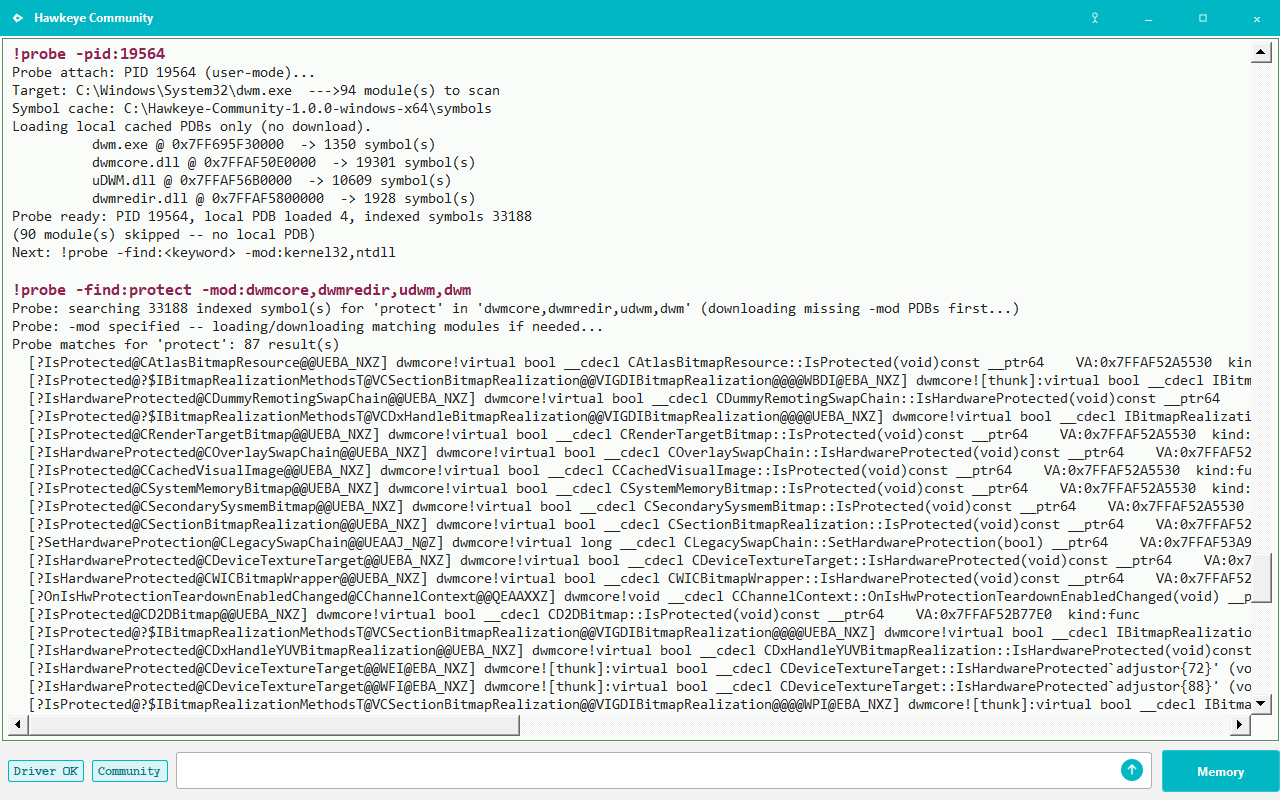
!probe -find:protect -mod:dwmcore,dwmredir,udwm,dwm
Figure 1. !probe -find:protect — many protection-related symbols; below we focus on CWindowContext.
Strongest candidates in dwmredir — two functions tied to window content:
CWindowContext::HasProtectedContent
CWindowContext::NotifyProtectionChange
The names are explicit: one tests whether window content is protected; the other notifies
the composition pipeline when protection changes. DWM also exposes many
IsProtected and SetHardwareProtection symbols worth
tracking separately.
5. What HasProtectedContent does
Disassembly of dwmredir!CWindowContext::HasProtectedContent is straightforward:
Figure 2. Load [rcx+0x114], SHR 6, AND 1 — i.e. test bit 6 (0x40) of that DWORD.
So CWindowContext carries a flag DWORD at offset +0x114;
bit 6 marks protected content (consistent with anti-capture semantics).
When locating CWindowContext instances, note the class has
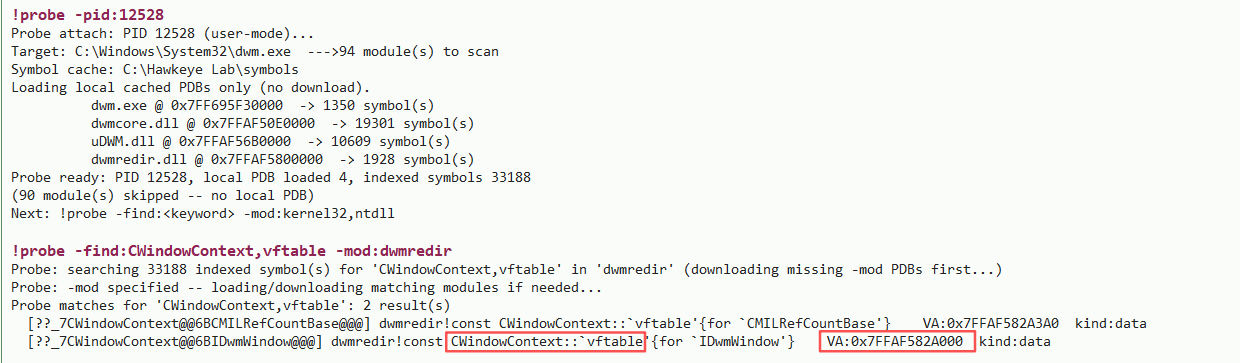
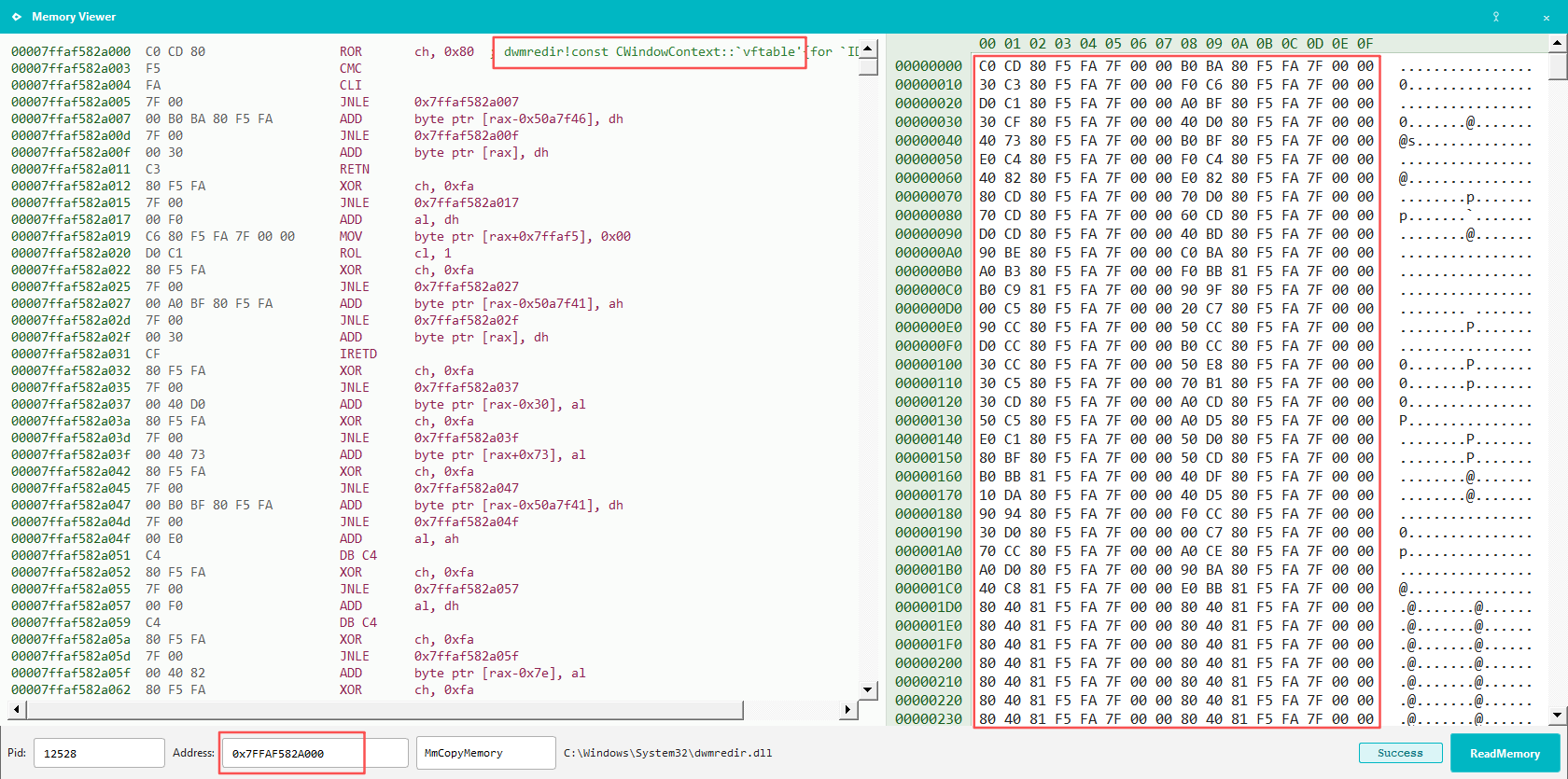
two vftables. Use the one for IDwmWindow
(example from build 26100 below):
Figure 3. !probe -find:CWindowContext,vftable -mod:dwmredir — locate the IDwmWindow vftable.Figure 4. Vftable lives in dwmredir.dll — use it to scan DWM heap objects.6. Memory validation
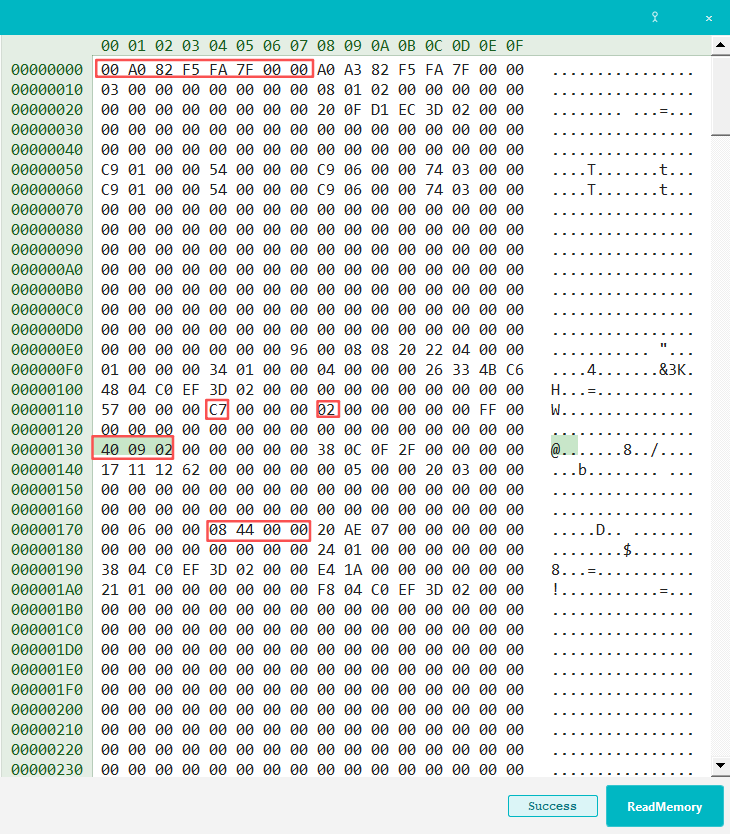
Experiment: call SetWindowDisplayAffinity(WDA_EXCLUDEFROMCAPTURE) on a window,
then search for that HWND value in dwm.exe with Cheat Engine to land on the
matching CWindowContext object.
Figure 5. Layout check: first 8 bytes = vftable; at +0x114, value 0xC7 has bit 6 (0x40) set; cross-check HWND and owning PID.
Field
Example
Notes
vftable
0x00007FFAF582A000
CWindowContext (IDwmWindow) vtable pointer
Protection flag
+0x114, bit 6 = 1
Matches HasProtectedContent disassembly
Window kind
0x1 / 0x2 / 0x4
DWM internal type enum (rough guess): 0x1 console-class, 0x2 GUI window (frameless / custom title bar), 0x4 GUI window
HWND / PID
Window handle and owning process ID
First 8 bytes of the object are the vftable pointer. Exact offsets (such as
+0x114 on build 26100) move between Windows builds, but the combination
vftable + protection bit + HWND/PID has been stable enough on
Windows 10 and 11 to build detection around. Treat figure values as
one validated snapshot, not constants to paste into a scanner.
7. Detection
Window composition for capture exclusion lives mainly in the DWM process and is
largely decoupled from the kernel path, so scanning dwm.exe is a practical
detection surface.
A workable scheme mirrors the manual CE steps above, but automates layout discovery:
Resolve the IDwmWindow vtable address from dwmredir.dll symbols (PDB).
Scan dwm.exe read-write regions for pointers equal to that vtable.
During calibration, enable anti-capture on a known window — Hawkeye
uses its own main window via SetWindowDisplayAffinity — then select the
matching object by vtable, protection bit 6, window kind, HWND, and owning PID.
Record object-relative offsets for flags, kind, HWND, and PID; reuse them on later scans.
Absolute field offsets change between Windows versions and builds. Portability comes from
anchoring on the vtable and running a one-time calibration on the target machine.
The open-source Community build does this automatically: vtable from
dwmredir.dll symbols, relative offsets learned during
!hidden_windows -init.
Window kind is filtered to 0x2 and 0x4 during scans even though
0x1 may appear in memory dumps.
8. Reference implementation (Hawkeye Community)
The detection approach in this article is implemented in Hawkeye Community:
!hidden_windows (run -init first) and the staging command
!hidden_windows_sim. Validated on most Windows 10 and 11
systems we tested — not every build or configuration.
The Community build resolves the CWindowContext / IDwmWindow
vtable from dwmredir.dll at runtime, calibrates relative offsets for flags,
kind, HWND, and PID during -init, then scans dwm.exe memory.
No fixed +0x114-style constants are baked into the scanner.